
Description
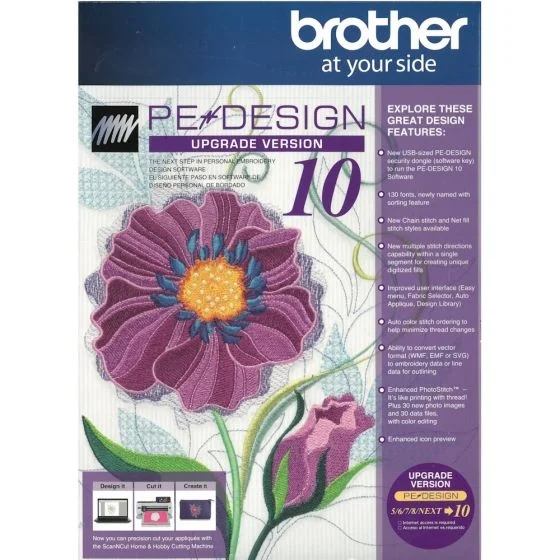
This is an UPGRADE. You must already have on of these versions Brother PE-Design on your PC before installing this.
Version 5/6/7/8/NEXT must already be installed on your PC.
PE-DESIGN® 10
New, convenient USB-style software key
130 built-in fonts, over 1000 built-in designs
View design thumbnails in Windows® Explorer
View names of built-in fonts
Enhanced PhotoStitch masks and color settings
Enhanced density setting for 3D and puffy foam
Intelligent color sort to reduce thread changes
New chain stitch and net fill stitch
Improved Stitch to Block now keeps sewing attribute
USB style Dongle with installation program on USB device.
New opening screen wizard
Fabric and hoop selector
Streamlined platform (3 tabs instead of 5)
Displays embroidery designs as thumbnails (pes data) show view icon options
120 Fonts + 10 micro fonts, fonts have been re-digitized, more characters and symbols have been added to some of the fonts and the character spacing has been adjusted
Font Filter
Names of Fonts and recommended min size added to built in fonts
New Stitch Types explain that gapping can result or lines can peek out.
Optimize Sewing Order Command Color Sorts and changes entry and exit points to closest connection
Matrix copy
Embroidered Patch Wizard
Cutwork Wizard available for all, but cutting function only available if PR hoop is selected
Enhanced Applique wizard can do multiple items on the screen, can do lettering without converting to outline all in one click, can do pre-digitized designs
Guideline function has been added
Hide objects not stitched in the Sewing order window
Hide items on screen to assist in editing Show Stitched Objects
Ghost image when using the split stitch function
Color list can be set to display Color Changes or Total colors
Import patterns docked on the Integrated Sewing Attributes Screen
New pattern categories
Left click and hold on a pattern and a dotted line will appear in the design window to show size
Smart color sort button
Block punch tool can be edited with outline tool functions including remove overlap, Merge, set hole sewing, create offset lines, applique wizard, create floral lines, etc.
All fills available for manual punch
Convert to Outline for Pre-digitized patterns
Split at point
Connect points
Split Outline tool
Paste Attributes command
EMF and SVG files can be digitized with the Import from Vector file
Patterns can be imported from Design Center into layout and editing as outline format for advanced editing
More right mouse click menu options
Guidelines addedfor alignment
Enhanced photo stitch
More designs
New 9 ½ x 14 in hoop for The Dream Machine
Measure tool has been improved left click to start, left click to end. Look at measurement at bottom of menu gives length height and angle of area measured
Resizing has been improved doesn’t tend to change the stitch type.
Import color charts
Moved Stitch view icons to bottom of screen
Double the density for puffy foam
Edit
Minimum PC Requirements
Computer: IBM PC or compatible computer
Operation System: Windows Vista®, Windows® 7/8/8.1/10
Processor: 1 GHz or higher
Memory: 512MB (1GB or more is recommended)
Hard Desk Free Space: 300MB
Monitor: XGA (1024×768), 16-bit color or higher
Reviews
There are no reviews yet.