
Description
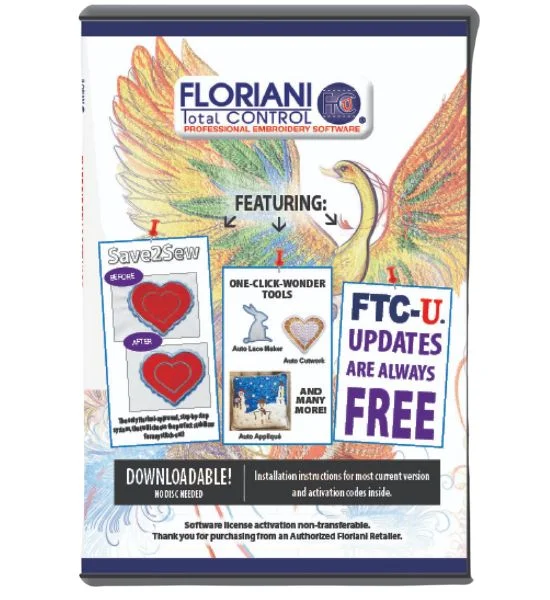
Introducing the Ultimate Digitizing Tool for Embroidery: DIGITIZING TOOLSAre you ready to take your embroidery designs to the next level? Look no further! Our DIGITIZING TOOLS software is a comprehensive and powerful embroidery digitizing solution packed with a wide range of features and tools to bring your creative visions to Features:
- Wave Gradient Fill Patterns: Add stunning wave gradient fill patterns to your designs, creating eye-catching and dynamic embroidery.
- Wave Color Blend Patterns: Achieve seamless color blending with wave patterns, giving your embroidery a professional and artistic touch.
- Apply Template Layouts to Designs: Streamline your design process by applying template layouts to your creations, ensuring consistency and precision.
- Create Name Drops: Personalize your embroidery with ease by creating custom name drops for that special, individualized touch.
- Create Button Hole: Effortlessly add buttonholes to your designs, making them functional and ready for a variety of applications.
- Advanced Font Upsize Warning System: Avoid font scaling issues with our advanced warning system, ensuring that your text looks perfect at any size.
- Enhanced Split Designs: Split your designs with precision and control, allowing for more complex and detailed embroidery projects.
- True Type Text Fonts: Access a wide range of true type text fonts to add stylish and customizable text elements to your designs.
- Text on Path: Create captivating and unique text designs by placing text on various paths within your embroidery.
- Single Line Satin Input Method: Achieve flawless satin stitching with our single-line input method, ensuring smooth and professional results.
- Convert Images to Vector Artwork: Easily transform images into vector artwork that can be exported or converted into stitches for embroidery.
- Cross Stitch Tool: Explore the world of cross-stitch embroidery with our specialized tool, opening up new creative possibilities.
- Auto Digitizing Wizard: Simplify your digitizing process with our wizard, which seamlessly converts vector and image files into stunning embroidery designs.
- Segmented Auto Digitizing: Enjoy precise control over auto digitizing with our segmented approach, allowing you to fine-tune your designs.
- Manual Digitizing: For the ultimate control, manually digitize your designs with precision and creativity.
- Multiple Stitch Types: Choose from a variety of stitch types, including manual, run, satin, steil, fill, applique, and cross stitch, to achieve your desired effects.
Special Features:
- Enhanced Save2Sew: Automatically adjust design density, underlay, and compensation based on the selected fabric type, ensuring perfect results every time.
- Photo Stitch Wizard: Transform your favorite photos into stunning embroidery with our user-friendly photo stitch wizard.
- Custom Distortion Effects: Add ZigZag, Wave, Twirl, Pinch, and Spherize distortions to objects for unique and artistic embroidery.
- Custom Emboss/Fancy Fill Patterns: Elevate your designs with custom emboss and fancy fill patterns that add depth and texture.
- Create Outline Feature: Enhance your designs with striking outlines that make your embroidery stand out.
- Color Blending Feature: Achieve seamless color blending in your designs, giving them a polished and professional look.
- Custom Motif Patterns: Create unique motif patterns to add flair and personality to your embroidery.
- Design Library: Organize your designs with ease using our design library, allowing for convenient drag-and-drop functionality onto your design page.
Editing Features:
- Slice Tool: Split one artwork element into multiple elements for precise editing and customization.
- Optimize Entry/Exit Points: Automatically rearrange entry and exit points for design optimization, ensuring smoother embroidery.
- Optimize Design Sequence: Automatically reorder the sewing sequence for optimal results and efficient embroidery.
- Color Sort Tool: Easily rearrange a design by color for a streamlined and organized workflow.
- Convert Between Stitch Types: Seamlessly switch between different stitch types to achieve your desired design effects.
- Unlimited Redo/Undo: Experiment and refine your designs with unlimited redo and undo capabilities.
- Resize with Stitch Regeneration: Resize your designs while maintaining stitch quality and accuracy.
- Alignment Tools/Functions: Precisely align and arrange design elements for professional results.
- Transform Designs/Objects: Easily scale, rotate, and manipulate design objects for creative freedom.
- Re-sequence Object in Sequence Manager: Take full control of your design sequence with the ability to re-sequence objects.
- Break Apart Text for Additional Editing: Edit individual text elements with ease by breaking them apart for more customization.
- Modify Start and End Points: Adjust the starting and ending points of design elements for optimal placement.
- Modify Stitch Direction/Angles: Fine-tune stitch direction and angles within design elements for unique effects.
- Modify Element Shape with Node Editing: Achieve precise design adjustments using node editing for element shaping.
- Change Density, Underlay, Compensation, Stitch Lengths: Customize your design’s properties to achieve the desired texture and appearance.
- Resize, Rotate, and Distort Lettering: Transform lettering with ease, adjusting size, orientation, and distortion as needed.
- Edit Individual Stitch Points: Make precise stitch point modifications for meticulous detailing.
- Add and Delete Individual Stitches: Fine-tune your designs by adding or removing individual stitches.
- Change Node Type/Properties: Customize node properties for complete control over design elements.
View Tools:
- Apply Fabric Texture Background: Visualize your designs with a fabric texture background for added context.
- Adjustable Grid Settings: Customize your grid with lines or dots, ensuring accurate design placement.
- Ruler: Measure design elements accurately with the built-in ruler tool.
- Fade Objects: Achieve depth and focus in your designs by fading objects as needed.
- Zoom In and Out: Easily zoom in and out of your design using mouse scroll for precision editing.
- Image Fading: Blend images seamlessly into your embroidery by adjusting their opacity.
- 3D Replication: Get a preview of your embroidery in a simulated stitch sewout, allowing for fine-tuning before production.
- Customizable Software Layout: Tailor your software layout to your preferences for a personalized experience.
- Slow Redraw – Simulated Stitch Sewout: Analyze your design’s stitch sewout in slow motion to ensure perfection.
- Floating or Docking Toolbars: Customize your workspace by choosing between floating or docking toolbars.
- Custom User-Created Guidelines: Create guidelines to assist with design alignment and positioning.
- Select/Hide Objects: Easily select or hide objects for focused editing.
- Select/Hide by Thread Color Sequence: Streamline your workflow by selecting or hiding objects based on thread color sequence.
- View Stitch Ends: Examine the end points of stitches for precision editing.
- View Design Sequence: Review your design’s sewing sequence for a comprehensive understanding.
Embroidery Formats Supported:
- Floriani Files (WAF)
- Baby Lock/Brother/Bernina (PES)
- Elna/Janome/Kenmore (SEW)
- Elna (EMD)
- Janome/Elna (JEF)
- Viking/Husqvarna (HUS)
- Pfaff (PCS)
- Tajima (DST)
- Singer/Poem (CSD)
- Singer (XXX)
- Melco (EXP)
Reviews
There are no reviews yet.